How to Change Partner in Exness and Get 80% Rebate Cashback
If you already have an Exness account and want to receive 80% Exness rebate cashback automatically from KGForexWorld, you need to change your existing Exness partner to KGForexWorld.
The process is straightforward and can be requested through Exness Live Chat.
What You Need Before Changing Your Partner
Before starting, make sure you have:
- Your existing Exness account
- Access to your Exness Personal Area
- The KGForexWorld referral link or 19-digit wallet account number
The refferal link: https://one.exnessonelink.com/a/r3bat3kgfx
19-digit wallet account number: 1059251701577471950
Important: You do not need to create a new Exness profile. First request the partner change on your existing Exness account.
Step 1: Log In to Your Existing Exness Account
Log in to your existing Exness Personal Area using your Exness account credentials. Make sure you are using the account where you want to change the partner.
Step 2: Open Exness Live Chat
After logging in, look for the Live Chat icon, usually located at the bottom-right corner of the screen.
Click the icon to start a conversation with Exness Support.
Step 3: Request to Change Your Partner
In the chat window, type:
Change Partner
Exness Support will provide you with the relevant instructions and a link to submit your partner-change request.
Step 4: Follow the Partner Change Instructions
Open the link provided by Exness and follow the instructions shown on the page.
You may be asked to provide information related to your requested partner change. Make sure you enter all requested information accurately. When Exness asks for your new partner or referral information, provide the KGForexWorld referral details.
You can use the KGForexWorld referral link or 19-digit wallet account number.
- The refferal link: https://one.exnessonelink.com/a/r3bat3kgfx
- 19-digit wallet account number: 1059251701577471950
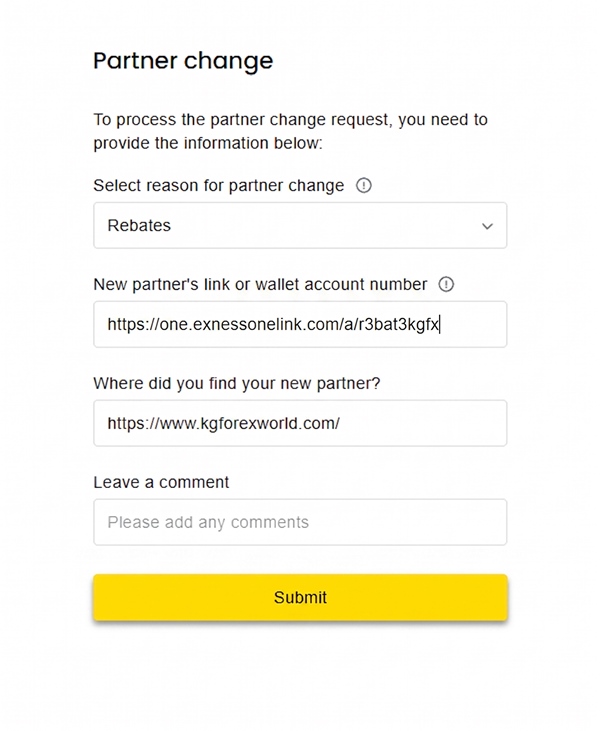
Double-check the number before submitting your request.
Step 5: Submit Your Request
Review the information you entered and submit the partner-change request. Your request will then be sent to Exness for review and approval.
Step 6: Submit the Verification Code
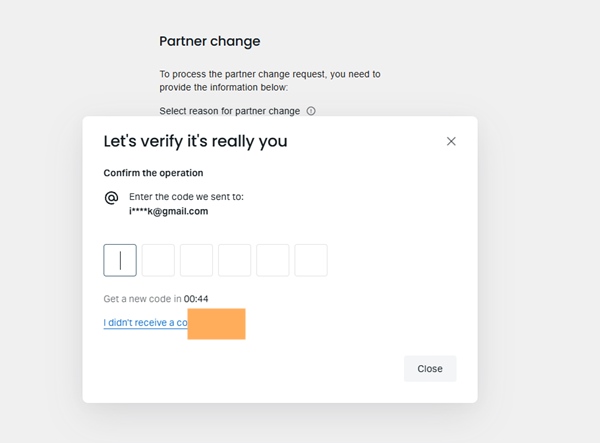
Exness will ask to verify the action. You can check the verification code that Exness send to your email, and submit it. If you can’t find the email in the main inbox, you can check in the spam or promotion folder in your email.
Step 7: Wait for Approval
Wait for Exness to process and approve your partner-change request. Do not open your new trading account until the partner change has been approved. When approved, you will get notification in your Exness Dashboard.
If necessary, you can contact Exness Support to check the status of your request.
Step 8: Open a New Trading Account After Approval
This step is extremely important.
After Exness has approved your partner-change request, you need to open a new trading account inside your existing Exness Personal Area.
The 80% Exness rebate cashback from KGForexWorld is intended to be automatically transferred to your new trading account opened after your partner change has been approved.
Your existing trading account should not be used for this purpose.
Example
Suppose you currently have:
- An existing Exness Personal Area
- An existing Trading Account A
- A submitted partner-change request
- An approved partner-change request
After the request has been approved, open:
- New Trading Account B
The new trading account should be the account connected to the KGForexWorld partner for the rebate.
Important Things to Remember
Do Not Open the New Trading Account Too Early
Wait until Exness has approved your partner-change request before opening your new trading account.
The correct order is:
Change partner → Wait for approval → Open a new trading account
You Do Not Need a New Exness Profile
You can continue using your existing Exness Personal Area. The process involves changing the partner and then opening a new trading account after approval.
Use the New Trading Account
After the partner change has been approved, make sure you open a new trading account before expecting the KGForexWorld rebate to be credited automatically.
Quick Summary
Here is the complete process:
- Log in to your existing Exness account.
- Open Live Chat with Exness.
- Type “Change Partner”.
- Follow the link and instructions provided by Exness.
- Enter the KGForexWorld referral link or wallet number 1059251701577471950.
- Submit the partner-change request.
- Wait for Exness approval.
- After approval, open a new trading account.
- Trade using the new account and receive the eligible 80% daily Exness rebate cashback automatically through KGForexWorld.
The Most Important Rule
Change partner → Wait for approval → Open a NEW trading account.
Following this order is important because the KGForexWorld rebate is intended to be automatically transferred to your new trading account opened after the partner change has been approved.